![pascal_logo.png]](https://help.vartion.com/hs-fs/hubfs/pascal_logo.png?width=160&height=42&name=pascal_logo.png)
Pascal 8.1 introduces Weighted risk, allowing your organisation to choose how Screening and Client onboarding contribute to the calculated client risk.
How It Works
1. Choose your calculation method
You can choose between two methods:
- Highest risk: uses the highest available risk from Screening and Client onboarding.
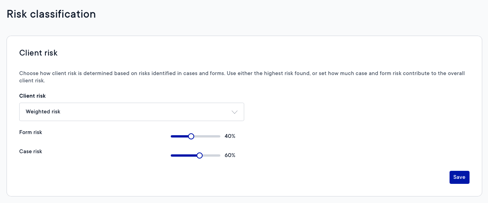
- Weighted risk: combines the risks from both modules using percentages configured by your organisation.
Highest risk remains the default until you change it. Weighted risk is available when both Screening and Client onboarding are active.
2. Set the contribution of each module
When selecting Weighted risk, assign a percentage to each module. The percentages must total 100%.
For example, you can let Screening contribute 40% and Client onboarding contribute 60%.
3. Understand the result
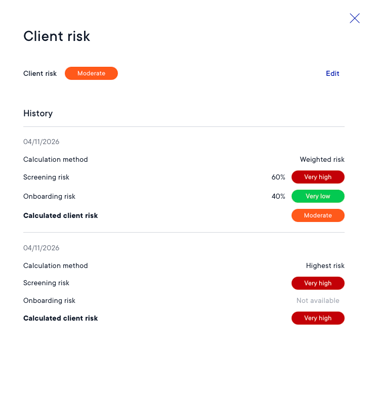
The risk explanation shows the source risk levels, the percentages used and the resulting client risk.
If a client only has a risk from one of the two modules, Pascal uses that available risk at 100% and shows this adjustment in the explanation. If either module is deactivated for your organisation, Pascal switches back to Highest risk.
How It’s Beneficial
- More control: choose how much Screening and Client onboarding each contribute to your client risk calculation.
- Transparent calculations: see which source risks and weights produced the result, helping your team explain and review it.
- Use of available information: calculate client risk even when a client does not yet have a risk from both modules.