![pascal_logo.png]](https://help.vartion.com/hs-fs/hubfs/pascal_logo.png?width=160&height=42&name=pascal_logo.png)
With Pascal 8.0, we're introducing a new client focused way of working, bringing client information, cases, and workflows together in one central workspace. From Screening and Onboarding to ongoing client reviews and Transaction Monitoring, you can now manage your clients and their related activities in one place.
This redesigned experience makes it easier to navigate between processes, focus on required actions, and maintain a complete overview of each Client throughout their lifecycle.
Explore the new client based experience
Discover the redesigned Pascal interface with our interactive tour. Learn how to navigate the new Client page, access important client information, and manage your daily workflows.
How it works
Everything about your client in one place
The redesigned Client page serves as a central workspace for accessing and managing client information and related activities.
Depending on the modules available in your environment, you can access Screening Cases, Forms, Reviews, Approvals, Transactions, and Alerts, alongside Notes, Documents, and Audit history.
With all relevant information available in one place, you can easily navigate between different workflows without having to switch between separate modules.
A clearer overview of client information
The updated client sidebar provides a simplified overview of essential Client information, including the Client status and calculated client risk.
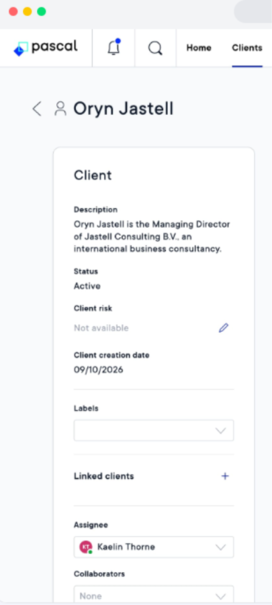
To view the history of changes and activities for a client:
- Open the relevant Client page.
- Click Show audit.
- View and filter the audit records to find relevant changes and activities.
This provides greater transparency into Client information and the decisions made throughout the Client lifecycle.

A redesigned Home page
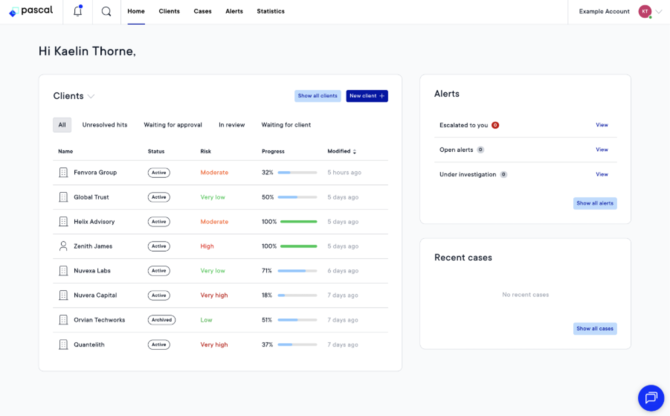
The Home page has been redesigned to support the new client focused workflow, providing easier access to your assigned Clients and Cases.
The new Clients overview card displays your assigned Clients by default, with options to filter the overview and quickly access relevant Clients.
If you primarily work with Cases, you can easily switch to the Cases instead of Clients view.
To navigate your assigned work:
- Open the Home page in Pascal.
- Use the dropdown on the overview card besides Clients to switch to Cases.
- Use the available filters to find the clients or cases relevant to you.
- Select a client or case to open its details and continue your work on the client or case.
The redesigned Home page helps you quickly access your daily tasks while maintaining the flexibility to work with either Clients or Cases.
How this benefits you
-
Centralisation – Access client information, cases, and related workflows in one place, providing a complete overview.
-
Efficiency – Navigate more easily between processes and quickly access your assigned clients, cases, and daily activities.
-
Transparency – Maintain a clearer understanding of Client status, Risk, and history, with easy access to relevant information and previous decisions.