![pascal_logo.png]](https://help.vartion.com/hs-fs/hubfs/pascal_logo.png?width=160&height=42&name=pascal_logo.png)
When cases are created for a company or contact record, the initial case status could be Preview or In review. After the lifecycle stage of the record changes to for example Customer, it can be beneficial to change the case status to Monitored. As the company/contact became a customer, the associated case will regularly be monitored for new hits. A workflow can change the case status automatically.
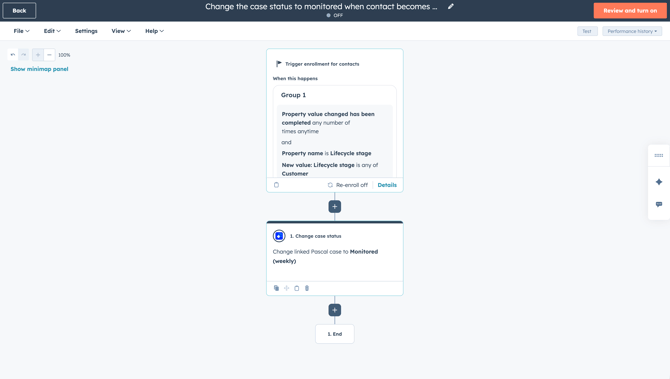
To set up this workflow, the following can be configured:
- Trigger:
- When property value changes: Lifecycle stage has the value Customer.
- Actions:
- Change case status: Change the linked Pascal case to the status Monitored. The options Daily, Weekly, Monthly, Quarterly, Half yearly and Yearly are available.
To set up this workflow for both contacts and companies with linked cases where new hits are found. Two workflows must be created, one based on contact records and another based on company records.
This documentation, including images, videos and text, is accurate as of Version 7.10 of Pascal.
We strive to keep our documentation up to date with each release to ensure it remains a reliable resource for our users. However, given the dynamic nature of our software development, there might be instances where changes introduced in subsequent versions are not immediately reflected in this documentation. We encourage users to refer to the latest release notes and to use the feedback mechanism for any discrepancies or requests for clarification.