![pascal_logo.png]](https://help.vartion.com/hs-fs/hubfs/pascal_logo.png?width=160&height=42&name=pascal_logo.png)
Pascal’s notification and email preferences can be customised to suit your needs. You can manage these settings on the Notifications page, located in the Pascal Settings menu.
In the Notifications page, you can customise the settings for the following sections: Monitoring, Transaction, and Notifications.
Transaction section is visible only if the Transaction monitoring module is enabled in your organisation
To change your notification and email settings, follow the below steps:
- Click on your initials in the top right corner.
- Click on Settings.
- In the left settings menu, navigate to the Notifications page in the Your account section.
- Scroll to the relevant section Monitoring, Transactions or Notifications, and change the setting you would like to edit by clicking the dropdown next to the option.
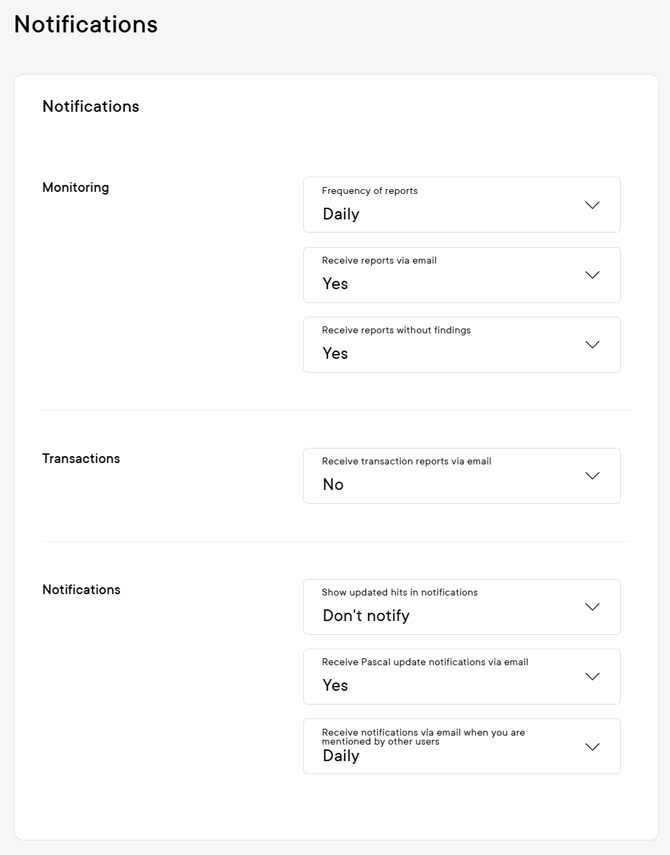
Monitoring
- Frequency of reports: Reports on your monitored cases can be received Daily, Weekly, or Monthly, with each report covering changes since the last report was received. The default setting is Daily.
- Receive reports via email: The monitoring reports can be sent to your email, which will link you to the monitoring reports page in Pascal. The default setting is No.
- Receive reports without findings: It can occur that no new information is found within the time period of a monitoring report. You can choose whether you still want to receive these reports with no findings. The default setting is No.
Transactions
- Receive transaction reports via email: On Mondays, the weekly objective transaction report can be sent to your email, highlighting the transactions flagged by Pascal that surpassed the predefined threshold. The default setting is No.
- Receive transaction report without finding: It can occur that no new information is found within the time period of making a transaction report. You can choose whether you still want to receive these reports. The default setting is No.
Notifications
- Show updated hits in notifications: In monitored cases, previously included or excluded hits may be updated. When this occurs, Pascal can notify you of the change based on your preference. Choose one of the following options:
- All – Receive notifications for all risk changes
- Only included hits – Receive notifications only for different changes in risk levels
- Don’t Notify – No notifications about updates in hits
- Receive Pascal update notifications via email: While the notification update are always shown as in-app, you can choose if to receive also these updates via email. The default is No.
- Receive notifications via email when you are mentioned by other users: Users decide how often they want these reminders, or not at all:
- Daily – Receive a daily summary email of unread mentions from the previous day.
- Weekly – Receive one weekly summary email of unread mentions from the past seven days, delivered once at the start of the business week.
- Never – Disable email reminders entirely.
This documentation, including images, videos and text, is accurate as of Version 7.5 of Pascal.
We strive to keep our documentation up to date with each release to ensure it remains a reliable resource for our users. However, given the dynamic nature of our software development, there might be instances where changes introduced in subsequent versions are not immediately reflected in this documentation. We encourage users to refer to the latest release notes and to use the feedback mechanism for any discrepancies or requests for clarification.