![pascal_logo.png]](https://help.vartion.com/hs-fs/hubfs/pascal_logo.png?width=160&height=42&name=pascal_logo.png)
When creating a Person. Business or Asset case in Pascal Screening the Name field is required to provide. More details will improve the hits found in the case. Especially the fields in the Person details for Person cases, Business details for Business cases and Asset details for Asset cases.
Changing the required fields will impact cases created in Pascal via the new case option, as well as creating cases via Pascal's import cases option and Pascal's API.
You can configure more fields to be mandatory to provide when creating new cases via the Screening settings in Pascal. To do this, follow the below steps:
- Click on your initials in the top right corner of the page.
- Navigate to the Settings in the newly shown menu.
- In the Screening section, open the Policies page.
- Scroll down to the Required fields card.
- Here, you can alter the required fields per case type by toggling the field on.
- After making the desired changes, press the Save button in the bottom right of the card. In the new dialog, press the Confirm button.
/How%20to%20configure%20the%20fields%20required%20to%20create%20a%20case/Required%20fields.png?width=670&height=376&name=Required%20fields.png)
All fields that are required to provide when creating a case:
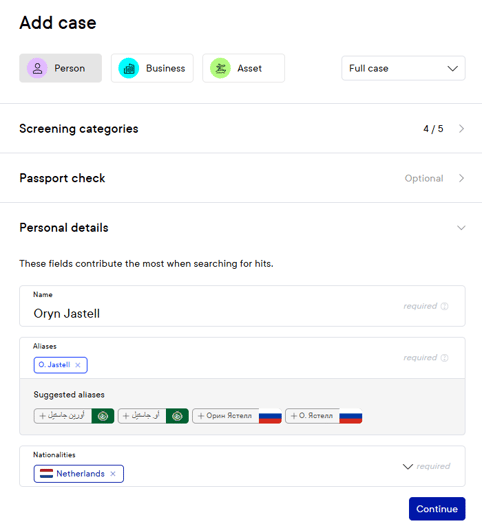
- Will show required in the field when populating in the New case dialog.
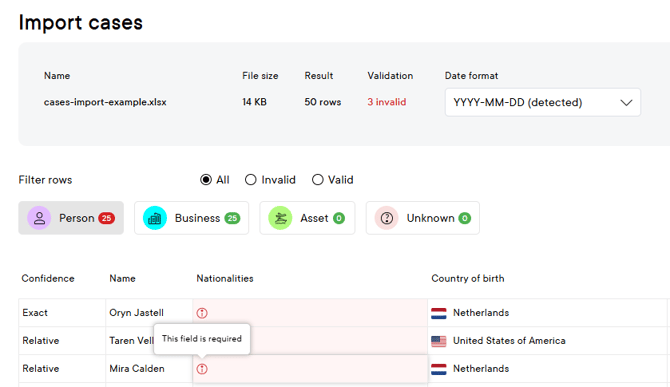
- Will show an error when required fields are empty in the Import cases option.
- Will return an error when creating cases via the Pascal API if required fields are not provided.
This documentation, including images, videos and text, is accurate as of Version 7.9 of Pascal.
We strive to keep our documentation up to date with each release to ensure it remains a reliable resource for our users. However, given the dynamic nature of our software development, there might be instances where changes introduced in subsequent versions are not immediately reflected in this documentation. We encourage users to refer to the latest release notes and to use the feedback mechanism for any discrepancies or requests for clarification.