![pascal_logo.png]](https://help.vartion.com/hs-fs/hubfs/pascal_logo.png?width=160&height=42&name=pascal_logo.png)
With the Pascal cards visible within your HubSpot contact and company records, screenings can easily be initiated. They can also be automated via HubSpot workflows or via a global setting in the Pascal app.
Manually creating a case
Within a contact or company record, two Pascal cards are available. The Screening resolvement card and the Screening overview card. If no case is yet linked to the record, a Create case button is present to create a new case.
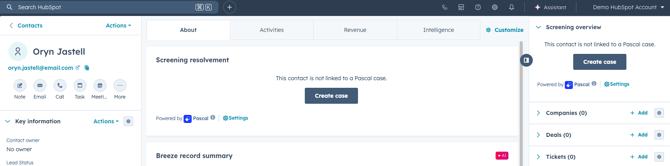
When pressing the Create case button, a case is created with the specifications of the mapped properties in HubSpot.
Which HubSpot properties are mapped to Pascal fields can be configured in the Pascal app settings. By default, Nationalities/Country is populated by the properties Country/Region (code), Additional terms is populated by the property Company name.
If an existing case matches the records details, a Link existing case button is present as well. Allowing you to link an existing case to the record, rather than creating a new one.
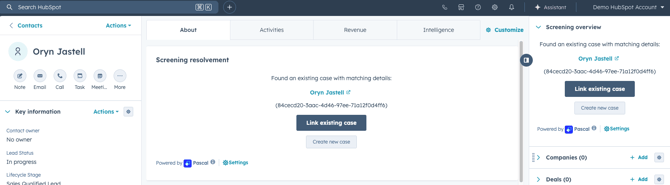
When pressing the Link existing case button, the presented case (identifiable with its presented name and identification number) is linked to the HubSpot record.
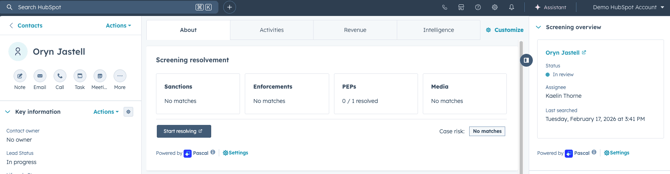
After creating a new case or linking an existing one, the results and details of the case are presented in the Screening overview and Screening resolvement cards.
Automated case creations
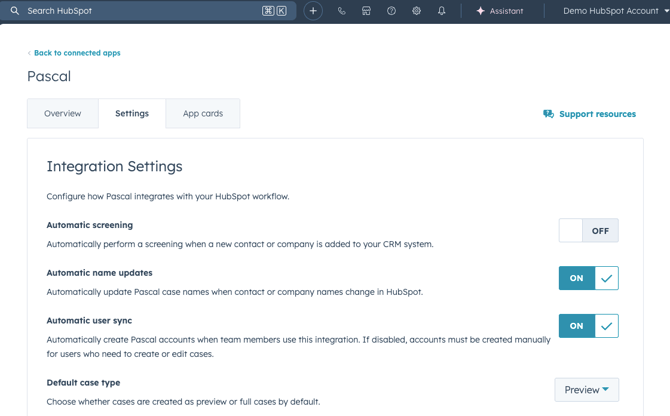
Within the Pascal app settings in HubSpot, the option Automatic screening can be turned on or off. With this option on, all Company and Contact records that are created will automatically be created as cases in Pascal. Allowing you to see results directly when viewing the Screening resolvement and Screening overview cards.
To navigate to this setting:
- Press the settings gear in the top bar.
- Under Integrations, click on Connected Apps.
- In the list of Connected Apps, click on Pascal.
- Click on the Settings tab.
- Turn the setting Automatic screening on or off in the Integration Settings section.
Creating cases via workflows
In HubSpot app Workflows, Pascal actions are available to create cases in a workflow:
-
Within a workflow with the Object type Contact, Person cases can be created for the specific contact going through the workflow.
-
Within a workflow with the Object type Company, Business cases can be created for the specific company going through the workflow.
The Pascal action Create case allows you to create a case for the specified record.
This documentation, including images, videos and text, is accurate as of Version 7.10 of Pascal.
We strive to keep our documentation up to date with each release to ensure it remains a reliable resource for our users. However, given the dynamic nature of our software development, there might be instances where changes introduced in subsequent versions are not immediately reflected in this documentation. We encourage users to refer to the latest release notes and to use the feedback mechanism for any discrepancies or requests for clarification.