---
title: How to set up Pascal’s cards in your HubSpot views
description: How to set up Pascal’s cards in your HubSpot views
---
[Skip to content](https://help.vartion.com/how-to-set-up-pascals-cards-in-your-hubspot-views#main-content)
English
Show submenu for translations
[Customer portal](https://portal.vartion.com/tickets-view?hsLang=en)
[![pascal\_logo.png\]](https://help.vartion.com/hs-fs/hubfs/pascal_logo.png?width=160&height=42&name=pascal_logo.png)](https://help.vartion.com/?hsLang=en)
Open main navigation
Close main navigation
- English
Show submenu for translations
- [Customer portal](https://portal.vartion.com/tickets-view)
- [Go to Pascal](https://pascal.vartion.com/)
[Go to Pascal](https://pascal.vartion.com/)
How can we help?
- There are no suggestions because the search field is empty.
1. [Product Documentation](https://help.vartion.com/?hsLang=en)
2. [General](https://help.vartion.com/general?hsLang=en)
3. [HubSpot](https://help.vartion.com/general?hsLang=en#hubspot)
# How to set up Pascal’s cards in your HubSpot views
After the Pascal app is installed and connected to your HubSpot environment, you can customise where to view information about the Pascal app.
Two cards are available to configure:
- Pascal's **Screening overview** card - provides general information on the linked Pascal case. If no Pascal case is linked, the option to link a case is available.
- Pascal's **Screening resolvement** card - provides details on the found results in the case and whether they are reviewed and resolved.
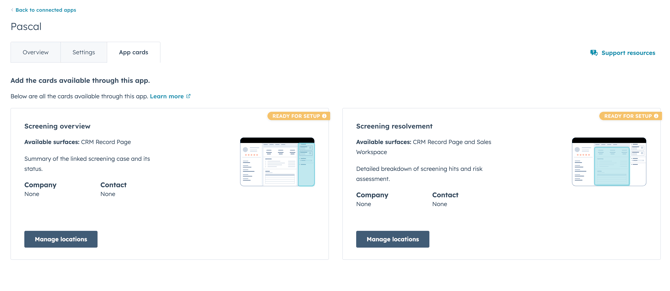
These cards can be configured in overviews with the **Manage locations** button. These two cards can be added to views of your choice for **Company records **and **Contact records**.
Position the cards in a preferred and visible location by using the **Customize** option when adding the cards.
#### Settings
Pascal's app has several settings to configure the integration to your preference. These settings are accessible in the Pascal app in **Connected apps** within HubSpot and in the **Integrations **settings within Pascal.
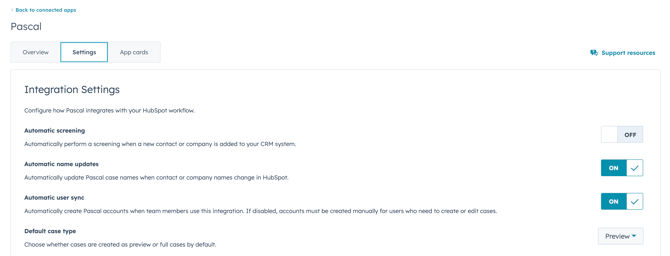
**Automatic screening** enabled will result in all new company and contact records to be automatically created as cases in Pascal.
**Automatic name updates** will ensure Pascal's case names are updated when the names of the records are updated.
**Automatic user sync** will grant access to all HubSpot users who utilise the Pascal screening cards to the Pascal system. If you wish to only grant specific people access to the Pascal system, this option can be turned off and users can managed via the **Users & groups** setting page in Pascal.
**Default case type** can be set to either **Preview** or **Full case** which will be the default type of cases that are created from records.
#### Field Mapping
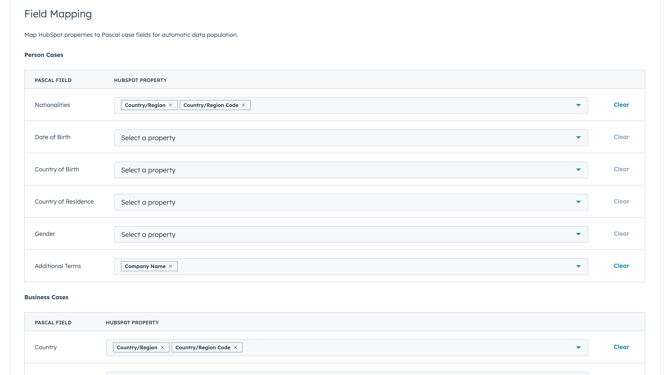
By default **Contact records** have mapped the **Name**, **Nationalities** and **Additional Terms** fields. **Company records** will have the **Name** and **Country** fields mapped. What HubSpot properties are used and additional fields can be configured via the field mapping setting in HubSpot. It can also be configured via the **Integrations** setting page in Pascal.
#### Properties from Pascal
The Pascal app introduces additional properties in HubSpot. These can give you a quick overview of information in Pascal or can be used within HubSpot workflows.
- **Case assignee** - the user or group assigned to the case in Pascal.
- **Case last searched** - the date the case was last searched for new results.
- **Case status** - the current status of the case.
- **Sanctions** - the number of unresolved sanctions in the case.
- **Enforcements** - the number of unresolved enforcements in the case.
- **PEPs** - the number of unresolved PEPs in the case.
- **Media** - the number of unresolved media hits in the case.
**This documentation, including images, videos and text, is accurate as of Version 7.11 of Pascal.**
We strive to keep our documentation up to date with each release to ensure it remains a reliable resource for our users. However, given the dynamic nature of our software development, there might be instances where changes introduced in subsequent versions are not immediately reflected in this documentation. We encourage users to refer to [the latest release notes](https://help.vartion.com/knowledge/general?hsLang=en#release-notes) and to use the feedback mechanism for any discrepancies or requests for clarification.
- [General](https://help.vartion.com/general?hsLang=en#main-content)
- [Release Notes](https://help.vartion.com/general?hsLang=en#release-notes)
- [What's New](https://help.vartion.com/general?hsLang=en#whats-new)
- [Risk Classification Settings](https://help.vartion.com/general?hsLang=en#risk-classification-settings)
- [HubSpot](https://help.vartion.com/general?hsLang=en#hubspot)
- [User Account Settings](https://help.vartion.com/general?hsLang=en#user-account-settings)
- [General](https://help.vartion.com/general?hsLang=en#general)
- [Billing](https://help.vartion.com/general?hsLang=en#billing)
- [Organisation Settings](https://help.vartion.com/general?hsLang=en#organisation-settings)
- [Integrations](https://help.vartion.com/general?hsLang=en#integrations)
- [Zapier](https://help.vartion.com/general?hsLang=en#zapier)
- [Screening](https://help.vartion.com/screening?hsLang=en#main-content)
- [FAQ](https://help.vartion.com/screening?hsLang=en#faq)
- [Cases](https://help.vartion.com/screening?hsLang=en#cases)
- [Clients](https://help.vartion.com/screening?hsLang=en#clients)
- [Statistics](https://help.vartion.com/screening?hsLang=en#statistics)
- [Getting Started with Pascal Screening](https://help.vartion.com/screening?hsLang=en#getting-started-with-pascal-screening)
- [Results in Pascal](https://help.vartion.com/screening?hsLang=en#results-in-pascal)
- [Notifications in Pascal Screening](https://help.vartion.com/screening?hsLang=en#notifications-in-pascal-screening)
- [Screening Settings](https://help.vartion.com/screening?hsLang=en#screening-settings)
- [Onboarding](https://help.vartion.com/onboarding?hsLang=en#main-content)
- [Getting Started with Pascal Onboarding](https://help.vartion.com/onboarding?hsLang=en#getting-started-with-pascal-onboarding)
- [Onboarding Settings](https://help.vartion.com/onboarding?hsLang=en#onboarding-settings)
- [Clients](https://help.vartion.com/onboarding?hsLang=en#clients)
- [Transactions](https://help.vartion.com/transactions?hsLang=en#main-content)
- [Getting Started with Pascal Transactions](https://help.vartion.com/transactions?hsLang=en#getting-started-with-pascal-transactions)
- [Settings](https://help.vartion.com/transactions?hsLang=en#settings)
[](https://vartion.com)
Copyright © 2025, Vartion B.V.