![pascal_logo.png]](https://help.vartion.com/hs-fs/hubfs/pascal_logo.png?width=160&height=42&name=pascal_logo.png)
The Resolvement tab in the statistics of Pascal shows the case overview in terms of unresolved hits of cases assigned to users. It includes a title with resolution status, which highlights some general statistics.
This view can be filtered on users, when no users are selected, all users will be shown in this overview.
The option Hide empty data allows you to filter out information of users and groups where no statistics are available.
By pressing the Export button, you can download an excel of the statistics.
If your account does not have a team manager, admin or owner role, you will not have the option to filter on users and will only see your own statistics.
Progress
In the Progress card, the users and groups selected in the filter are visible with some resolving information. Unresolved hits shows the percentage of hits that the user or group has resolved against all hits the user or group is responsible for. Monitored cases presents the number of cases this user is responsible for which are being monitored. The last activity of the users and groups indicate the last time the user or a user in the group was active.
Unresolved hits
This card shows the total number of unresolved hits for all users and groups selected in the filters at the top of this page. If no users or groups are selected, the total unresolved hits of all assigned cases are presented here.
Unresolved hits by screening category
This card shows for users and groups per screening category how many hits are left to resolve. All users and groups selected in the filter at the top of the page will be shown in this table. If no users are selected, all users and groups in your Pascal environment will be shown here.
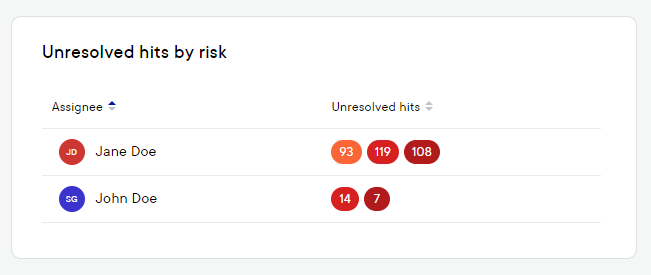
Unresolved hits by risk
This table shows the unresolved hits for every selected user and group, based on the risk associated with the still to resolve hits. The colour dark red indicates hits with a very high risk, red indicates a high risk, orange indicates a moderate risk, dark green indicates a low risk and light green indicates a very low risk.
By pressing the Export button, you can download an excel of the statistics for the Cases.
This documentation, including images, videos and text, is accurate as of Version 7.13 of Pascal.
We strive to keep our documentation up to date with each release to ensure it remains a reliable resource for our users. However, given the dynamic nature of our software development, there might be instances where changes introduced in subsequent versions are not immediately reflected in this documentation. We encourage users to refer to the latest release notes and to use the feedback mechanism for any discrepancies or requests for clarification.